
What Is Caching?
Caching is a technique of storing a copy of data that has already been retrieved, so the application can reuse it instead of fetching the same data from the original source every time. The original source could be a database, an external API, a file, or any other operation that takes noticeable time or resources to execute. The cache keeps this frequently used data in a faster storage location, allowing the application to retrieve it more quickly when it is needed again.
For example, consider an API that returns product details from a database. When a request for a product arrives, the application queries the database, gets the product, and returns it to the client. If the same product is requested again shortly after, the application would normally perform the same database query again. Caching allows us to keep the result of the first query and reuse that result for subsequent requests instead of going back to the database every time.
The important thing to understand is that a cache is not the source of truth. It is an additional layer that keeps a temporary copy of data to improve performance. The database can still contain the actual product information, while the cache simply holds a copy that the application can use when appropriate. Because the cached value can expire or become outdated, the application should always have a way to retrieve the latest value from the original source.
Caching therefore introduces a simple trade-off. We get faster reads and reduce the number of expensive operations, but we also need to decide what should be cached, how long it should remain there, and what should happen when the underlying data changes. These decisions become especially important when an application runs across multiple instances, which is where the different caching approaches start to matter.
Why Do We Need Caching?
Consider an API that returns product details. Every time a request comes in, the application may need to query the database, execute the required SQL, read the result, map it to an object, and then return the response. For a small number of requests, this is usually not a problem. But if the same product is requested thousands of times, the application is repeatedly performing the same work even though the result may not have changed.
This repeated work becomes more noticeable as the application grows. Database queries consume CPU, memory, connections, and I/O, while external API calls also introduce network latency and may have rate limits or additional costs. If a large number of requests are all asking for data that changes only occasionally, sending every request back to the original source is often unnecessary.
Caching allows the application to reuse a result that has already been retrieved. Once the data is available in the cache, a subsequent request can return it directly without performing the expensive operation again. This reduces the load on the underlying system and usually improves response time because reading from a cache is typically much faster than querying a database or calling an external service.
The important part is that caching is most useful when the same data is requested repeatedly and does not change frequently. If every request requires completely fresh data, caching may provide little benefit and can introduce unnecessary complexity. So the goal is not to cache everything. The goal is to identify data where avoiding repeated work provides a meaningful performance benefit.
Types of Caching
Caching can be implemented in different ways depending on where the cached data is stored and how widely it needs to be shared. In .NET applications, the most relevant approaches for us are in-memory caching, distributed caching, and hybrid caching.
1. In-Memory Caching
In-memory caching stores cached data directly in the memory of the application instance. In ASP.NET Core, this is commonly implemented using IMemoryCache.
It is very fast because the application can access the data directly from its own memory, without making a network call to another caching system. The main limitation is that the cache exists only inside that particular application instance. If the application is restarted, the cached data is lost, and if the application runs on multiple instances, each instance has its own separate cache.
2. Distributed Caching
Distributed caching stores cached data outside the application instance, in a shared caching system that multiple application instances can access.
This becomes useful when an application is running on multiple servers or containers. Instead of every instance maintaining its own independent cache, all instances can access the same cached data. Redis is one of the most commonly used technologies for this approach.
The trade-off is that accessing a distributed cache involves network communication, so it is generally slower than reading directly from local memory. However, it provides something that local memory cannot easily provide: a shared cache across application instances.
3. Hybrid Caching
Hybrid caching combines both approaches. Frequently accessed data can be kept in the application's local memory for very fast access, while a distributed cache acts as a shared second layer.
In modern .NET applications, HybridCache provides this model by combining a local in-memory cache with a distributed cache such as Redis. If the value is available locally, the application can return it without making a network call. If it is not available locally, the distributed cache can be checked before going back to the original data source.
This gives us a useful progression:
In-Memory Cache → Distributed Cache → Hybrid Cache
In-Memory Caching with IMemoryCache
In-memory caching is the simplest of the three approaches because the cached data lives directly inside the memory of the application. ASP.NET Core provides IMemoryCache for this purpose. When the application retrieves some data from a database or another source, it can store that result in the memory cache and reuse it for subsequent requests instead of performing the same operation again.
To use IMemoryCache, we first need to register it with dependency injection:
builder.Services.AddMemoryCache();Once registered, we can inject IMemoryCache into the service where caching is required. A simple example would be a product service that first checks the cache and only queries the database when the product is not already cached:
public class ProductService
{
    private readonly IMemoryCache _cache;
    private readonly AppDbContext _db;

    public ProductService(IMemoryCache cache, AppDbContext db)
    {
        _cache = cache;
        _db = db;
    }

    public async Task<Product?> GetProductAsync(int id)
    {
        var cacheKey = $"product:{id}";

        if (_cache.TryGetValue(cacheKey, out Product? product))
        {
            return product;
        }

        product = await _db.Products.FindAsync(id);

        if (product is not null)
        {
            _cache.Set(
                cacheKey,
                product,
                TimeSpan.FromMinutes(10));
        }

        return product;
    }
}
The first request for a product results in a cache miss, so the service queries the database and stores the returned product in memory. When another request asks for the same product, TryGetValue finds the cached value and returns it directly. The database is only accessed again when the cached entry is no longer available.
The 10-minute expiration in this example is just one possible caching policy. The application can use different expiration strategies depending on how frequently the underlying data changes. This is important because cached data is only a copy of the original data, and keeping it forever could result in stale information.
There is, however, an important limitation with this approach. The cache belongs to the application instance. If our application is running on multiple servers or containers, each instance has its own memory and therefore its own cache. A product cached by one instance is not automatically available to another instance.
Limitations of In-Memory Caching
IMemoryCache works well when the application is running as a single instance because all requests handled by that instance can access the same cached data. The situation changes when the application is scaled horizontally. Suppose we have three application instances running behind a load balancer. Each instance has its own memory, so each one also has its own separate cache.
This means the same product might be stored three times, once in each application's memory. A request for that product could hit Instance 1 and get a cache hit, while the next request could be routed to Instance 2, where the same product is not cached yet. Instance 2 then has to query the database and create its own cache entry. The cache is no longer shared across the application.
There is another important limitation: the cached data disappears when the application instance restarts. Deployments, crashes, container replacements, or other restarts can clear the in-memory cache. After the application starts again, the cache has to be populated from the original data source as requests arrive.
For a small application or data that is inexpensive to retrieve, these limitations may be perfectly acceptable. But as an application grows and starts running across multiple instances, having a cache that every instance can access becomes much more useful. That is the problem distributed caching is designed to solve.
What Is Distributed Caching?
Distributed caching moves the cache outside the application's memory and stores it in a separate system that can be accessed by multiple application instances. Instead of each instance maintaining its own copy of the cached data, the instances can share the same cache. This makes distributed caching a better fit for applications that are running on multiple servers, containers, or instances.
Consider the same three-instance application from the previous section. With an in-memory cache, each instance has its own copy of product:10. With a distributed cache, all three instances can access the same cached entry. A request can reach any instance, and that instance can retrieve the value from the shared cache instead of querying the database again.
The cache itself is usually provided by a dedicated system designed for fast data access. Redis is one of the most commonly used options for this purpose. The application communicates with Redis over the network, stores values using keys, and retrieves them when required. Since Redis is separate from the application instances, restarting one application instance does not remove the cached data from Redis.
There is a trade-off compared with in-memory caching. Reading from a distributed cache requires a network call, so it is not quite as fast as reading directly from the application's memory. However, the shared nature of the cache makes it much more suitable for horizontally scaled applications. The application gets a central cache that all instances can use instead of maintaining separate local copies.
Redis as a Distributed Cache
Redis is an in-memory data store that can be used as a distributed cache. Unlike IMemoryCache, which stores data inside the memory of the application itself, Redis runs as a separate service. Multiple application instances can connect to the same Redis server and access the same cached data.
Redis stores data using a key-value model. The application chooses a key such as product:10 and associates it with the value that needs to be cached. When another request needs the same product, the application can use the key to retrieve the cached value from Redis instead of querying the database.
Redis also supports expiration for cached values. When an entry is stored, we can specify how long it should remain available. Once the expiration time is reached, Redis removes the entry, allowing the application to retrieve a fresh value from the original data source when it is requested again. This makes Redis useful for temporary application data where keeping an indefinitely old value would not be appropriate.
Because Redis runs separately from the application, all instances of a scaled-out application can connect to the same cache. This solves the main problem we had with IMemoryCache: the cache is no longer tied to a particular application instance.
For local development, we don't need to install Redis directly on the machine. We can run it as a Docker container, which gives us a Redis instance that behaves much like the external Redis service our application could use in a deployed environment.
Running Redis with Docker
For local development, the easiest way to run Redis is through Docker. Instead of installing Redis directly on the machine, we can start a Redis container and expose its default port to our application.
Make sure Docker is installed and running, then execute:
docker run --name redis-cache -p 6379:6379 -d redisThis command downloads the Redis image if it is not already available locally, creates a container named redis-cache, and starts Redis in the background. The -p 6379:6379 part maps Redis's default port inside the container to port 6379 on our machine.
We can verify that the container is running with:
docker psYou should see the redis-cache container in the list with port 6379 exposed. At this point, Redis is running locally and can accept connections from our .NET application.
The important part is that our application does not need to know whether Redis is running inside Docker or on a separate server. It simply connects to the Redis endpoint. For local development, that endpoint is:
localhost:6379This gives us a real Redis instance to work with while developing the application, without requiring Redis to be installed directly on the host machine.
Implementing Distributed Caching with Redis
With Redis running separately from our application, the next step is connecting our .NET application to it. ASP.NET Core provides the IDistributedCache abstraction for distributed caching, so our application code does not need to depend directly on Redis-specific APIs for basic cache operations.
For Redis, we can add the Redis distributed cache package:
dotnet add package Microsoft.Extensions.Caching.StackExchangeRedisWe then register Redis with dependency injection and provide the Redis connection string:
builder.Services.AddStackExchangeRedisCache(options =>
{
    options.Configuration = "localhost:6379";
});
Once registered, we can inject IDistributedCache into our service. Unlike IMemoryCache, the distributed cache works with serialized data, so we need to convert our object into a format that can be stored in Redis. JSON is a common choice for this:
public class ProductService
{
    private readonly IDistributedCache _cache;
    private readonly AppDbContext _db;

    public ProductService(
        IDistributedCache cache,
        AppDbContext db)
    {
        _cache = cache;
        _db = db;
    }

    public async Task<Product?> GetProductAsync(int id)
    {
        var cacheKey = $"product:{id}";

        var cachedProduct = await _cache.GetStringAsync(cacheKey);

        if (cachedProduct is not null)
        {
            return JsonSerializer.Deserialize<Product>(cachedProduct);
        }

        var product = await _db.Products.FindAsync(id);

        if (product is not null)
        {
            var serializedProduct = JsonSerializer.Serialize(product);

            await _cache.SetStringAsync(
                cacheKey,
                serializedProduct,
                new DistributedCacheEntryOptions
                {
                    AbsoluteExpirationRelativeToNow = TimeSpan.FromMinutes(10)
                });
        }

        return product;
    }
}
The behavior is similar to IMemoryCache: first we check whether the value exists in the cache. If it does, we return it without querying the database. If it does not, we retrieve the product from the database, serialize it, and store it in Redis with an expiration time.
The important difference is where the data lives. With IMemoryCache, the value stays inside the application's memory. With IDistributedCache backed by Redis, the value is stored in Redis and can therefore be accessed by different application instances. This makes the cache shared across the application rather than tied to a single instance.
What Is HybridCache?
IMemoryCache gives us very fast local access, while Redis gives us a shared cache that can be accessed by multiple application instances. Each approach solves a different problem, but they also have their own trade-offs. Local memory is faster, but it is limited to one application instance. Redis is shared, but every cache access requires communication with the Redis server.
HybridCache combines these two layers. It uses a local in-memory cache as the first layer and a distributed cache as the second layer. In a typical setup, Redis can be used as the distributed layer, giving the application both fast local access and a shared cache across instances.
The idea is that a frequently requested value can be available in the application's memory, so the application does not need to contact Redis for every request. When the value is not available in the local cache, HybridCache can use the distributed cache before going back to the original data source.
How HybridCache Works
HybridCache uses two cache levels to handle a request. The first level is the local in-memory cache of the current application instance. The second level is the configured distributed cache, such as Redis. When the application requests a value, the local cache is checked first. If the value is available there, it can be returned immediately without contacting Redis or the original data source.
If the value is not available in the local cache, HybridCache checks the distributed cache. If Redis contains the value, HybridCache returns that value and also stores it in the local cache. This means the current application instance now has the value in L1, so subsequent requests handled by that instance can be served directly from local memory.
If the value is missing from both cache levels, HybridCache retrieves the data from the original source, such as a database or external API. Once the data is retrieved, HybridCache stores the value in both the local cache and the distributed cache. Future requests can therefore be served from L1 on the same instance, while other application instances can retrieve the value from the shared L2 cache.
The important point is that the two cache levels have different responsibilities. L1 is about speed within an application instance, while L2 is about sharing cached data between application instances. HybridCache coordinates these layers so that application code does not have to manually implement the lookup and population logic.
The overall behavior looks like this:
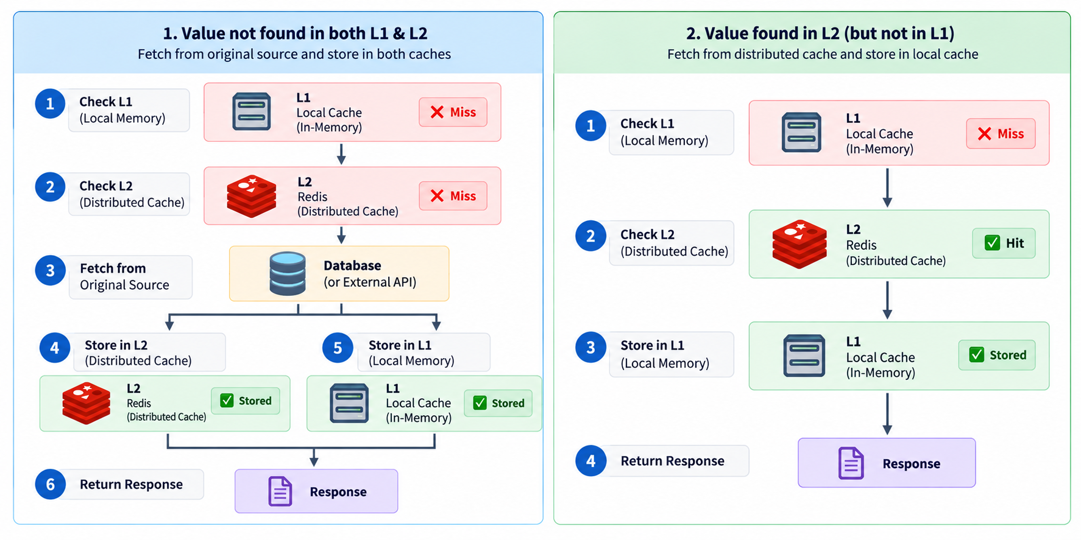
This is what makes HybridCache different from simply using Redis. With IDistributedCache, the application directly interacts with the distributed cache for each lookup. With HybridCache, a local L1 hit can avoid that network round trip, while Redis remains available as the shared L2 cache when the local instance does not have the value.
Implementing HybridCache
To use HybridCache, we first need to register it with the application's dependency injection container. The distributed cache is optional. If we want Redis to act as the L2 cache, we register Redis as the IDistributedCache implementation and then add HybridCache.
builder.Services.AddStackExchangeRedisCache(options =>
{
    options.Configuration = "localhost:6379";
});

builder.Services.AddHybridCache();
If we only register HybridCache without registering an IDistributedCache implementation, it still works, but only the local L1 cache is available:
builder.Services.AddHybridCache();In that case, there is no Redis or other distributed cache involved. This can be useful when an application does not need a shared cache, while still allowing us to use the same HybridCache API.
When a distributed cache is registered, HybridCache uses the application's configured IDistributedCache implementation as its L2 cache. For example, AddStackExchangeRedisCache registers Redis as an IDistributedCache implementation, so Redis becomes the secondary cache.
We should also avoid registering multiple unkeyed IDistributedCache implementations and expecting HybridCache to choose between them. If multiple implementations are registered for the same service type, the normal .NET dependency injection rules apply when a single IDistributedCache is resolved. With the default DI container, the last registration is the one resolved for a single IDistributedCache dependency. HybridCache does not automatically combine or select between multiple distributed caches.
Once registered, we can inject HybridCache into our service. Instead of manually checking L1, then L2, and finally the database, we use GetOrCreateAsync and provide a factory that retrieves the data when it is not already cached.
public class ProductService
{
    private readonly HybridCache _cache;
    private readonly AppDbContext _db;

    public ProductService(HybridCache cache, AppDbContext db)
    {
        _cache = cache;
        _db = db;
    }

    public async Task<Product?> GetProductAsync(int id)
    {
        var cacheKey = $"product:{id}";

        return await _cache.GetOrCreateAsync(
            cacheKey,
            async cancellationToken =>
            {
                return await _db.Products.FindAsync(
                    id,
                    cancellationToken);
            });
    }
}
The important difference from our earlier IMemoryCache and IDistributedCache examples is that we no longer have to explicitly check whether the value exists in either cache. HybridCache handles the lookup process for us. It checks the local cache first, then the configured distributed cache, and only executes the factory when the value cannot be found in either cache.
When the factory retrieves a product from the database, HybridCache stores the resulting value in both cache layers when a distributed cache is configured. If the value is found in the distributed cache, it can also populate the local cache for the current application instance.
We can also specify how long the cached value should remain available by providing HybridCacheEntryOptions:
var options = new HybridCacheEntryOptions
{
    Expiration = TimeSpan.FromMinutes(10),
    LocalCacheExpiration = TimeSpan.FromMinutes(2)
};

return await _cache.GetOrCreateAsync(
    cacheKey,
    async cancellationToken =>
    {
        return await _db.Products.FindAsync(
            id,
            cancellationToken);
    },
    options);
Here, Expiration controls how long the value can remain in the distributed cache, while LocalCacheExpiration controls how long the value remains in the local L1 cache. This allows the local copy to expire sooner while the value can continue to be available from the shared distributed cache.
Cache Expiration and Invalidation
Cached data is temporary, which means we need to decide how long a value should remain available. If a product is cached for too long, the application may continue returning an outdated value even after the product has changed in the database. If it expires too quickly, the cache becomes less useful because the application has to repeatedly retrieve the same data from the original source.
The way we manage expiration depends on which caching approach we are using. With IMemoryCache, expiration can be configured directly when storing the value:
_cache.Set(
    cacheKey,
    product,
    TimeSpan.FromMinutes(10));
Once the entry expires, IMemoryCache removes it from the application's local cache. The next request becomes a cache miss and the application can retrieve the latest value from the database.
With IDistributedCache, the expiration is stored along with the distributed cache entry. For example, when using Redis:
await _cache.SetStringAsync(
    cacheKey,
    serializedProduct,
    new DistributedCacheEntryOptions
    {
        AbsoluteExpirationRelativeToNow = TimeSpan.FromMinutes(10)
    });
The entry remains available in the distributed cache until its expiration. Once it expires, Redis no longer returns that value, and the application has to retrieve it from the original source.
HybridCache adds another level because it maintains both a local and a distributed copy. We can control the lifetime of each copy separately:
var options = new HybridCacheEntryOptions
{
    Expiration = TimeSpan.FromMinutes(10),
    LocalCacheExpiration = TimeSpan.FromMinutes(2)
};
Here, the distributed cache entry can remain available for up to ten minutes, while the local L1 copy expires after two minutes. If the local copy expires but the Redis entry is still valid, HybridCache can retrieve the value from Redis and populate the local cache again.
Expiration is not the only way to remove cached data. We may also need to invalidate a value when the underlying data changes. Suppose product:10 is cached and the product is updated in the database. The cached value is now stale, so waiting for its normal expiration may cause the application to return outdated information.
For IMemoryCache, we can explicitly remove an entry using its key:
_cache.Remove(cacheKey);For IDistributedCache, we can remove the corresponding distributed entry:
await _cache.RemoveAsync(cacheKey);With HybridCache, we can remove the cached value through the same abstraction:
await _cache.RemoveAsync(cacheKey);This is particularly useful because HybridCache manages both cache layers for us rather than requiring the application to separately remove the local and distributed copies.
So there are two common ways to keep cached data under control: expiration and explicit invalidation. Expiration is useful when data can remain valid for a known period, while invalidation is useful when we know exactly when the underlying data has changed. In practice, applications often use both approaches together.
Common Caching Mistakes
Caching can improve performance significantly, but using it without considering the application's data and behavior can create problems.
-
Caching everything
Not every piece of data is expensive to retrieve or requested frequently enough to justify caching. Adding a cache where there is little benefit only introduces another layer that the application has to manage. -
Choosing the wrong expiration time
A very long expiration can cause users to receive stale data, while a very short expiration can result in frequent cache misses. The expiration should depend on how often the underlying data changes and how much stale data the application can tolerate. -
Ignoring cache invalidation
If the application updates a product in the database but leaves the old cached value untouched, subsequent requests may continue returning the old value until the cache expires. When data changes as part of a known operation, explicitly removing or updating the corresponding cache entry can be a better approach. -
Poorly designed cache keys
A cache key should uniquely identify the data being cached and remain consistent across the application. For example,product:10andproduct-10would create two different entries for the same product, resulting in unnecessary cache misses. -
Treating the cache as the source of truth
A cache is a temporary copy of data, not the system that owns that data. The application should always have a reliable original source, such as a database or external service, when the cache misses or the cached value expires. -
Caching sensitive or user-specific data carelessly
Shared caches require careful key design and isolation. Otherwise, one user's cached data could accidentally be returned to another user. Performance improvements should never come at the cost of incorrect data access.
The goal of caching is not simply to cache as much as possible. The cache should reduce expensive repeated work while still keeping the application's data behavior correct.
Conclusion
Caching gives us a way to avoid doing the same expensive work repeatedly. In .NET, we can choose the caching approach based on how the application is deployed and how the data behaves.
We started with IMemoryCache, which is simple and extremely fast but limited to a single application instance. When the application needs to share cached data across multiple instances, a distributed cache such as Redis becomes a better fit.
HybridCache combines both approaches by using local memory as L1 and a distributed cache as L2. This allows frequently accessed data to be served quickly from local memory while still keeping a shared cache available across application instances.
The important part is not simply adding a cache. We also need to think about expiration, invalidation, cache keys, stale data, and whether the data is actually worth caching. When these decisions are made carefully, caching can significantly reduce database and external service load while improving application performance.
Source Code
You can find the complete source code and examples used in this article on GitHub:
- GitHub Repository: https://github.com/YogeshHadiya33/CachingInDotNet
Feel free to explore the code and try the examples yourself.