Introduction
In the previous article, we introduced MediatR into our Product Management Web API and used it to handle commands and queries through IMediator. This made the interaction between controllers and handlers simpler and helped keep the request handling logic focused.
But as the application grows, another question comes up: what if we need to execute some common logic before or after every MediatR request? For example, we might want to add logging, validation, performance monitoring, or other common processing without adding the same code to every handler.
MediatR Pipeline Behaviors solve exactly this. They let you wrap logic around a handler - code that runs before the request reaches the handler and again after it returns a response - without touching the handler itself.
In this article, we'll use the same Product Management Web API from the previous article to understand how Pipeline Behaviors work and create a simple behavior from scratch.
What Are MediatR Pipeline Behaviors?
A Pipeline Behavior is a class that sits between IMediator.Send() and the handler. Before the handler runs, the behavior gets control. It can do some work, call next() to let the handler execute, and then do more work on the way back out.
The handler itself doesn't know any of this is happening - you're adding shared logic across requests without touching a single handler.
How the MediatR Pipeline Works
When a controller sends a request using IMediator.Send(), the request does not go directly to the handler. MediatR passes it through the configured Pipeline Behaviors first.
The basic flow looks like this:
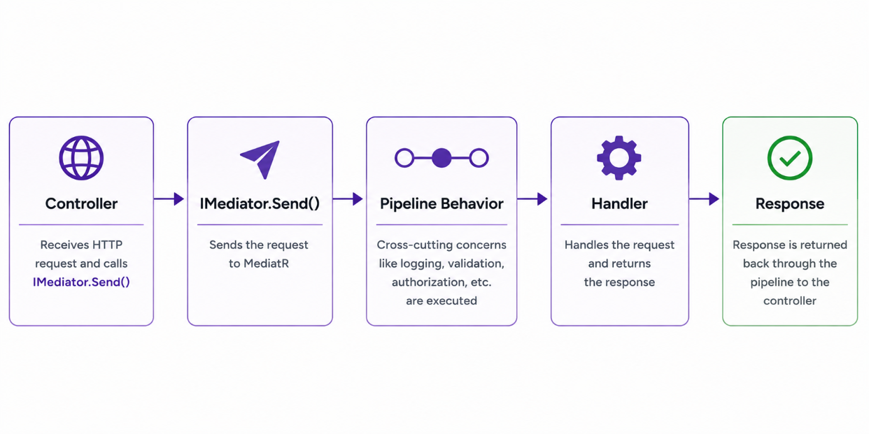
A behavior wraps the handler - code before next() runs on the way in, code after runs on the way out.
Creating Our First Pipeline Behavior
Now let's create our first Pipeline Behavior in the Product Management API. We'll call it LoggingBehavior because logging is a common example of logic that can be applied around multiple requests.
Create a Behaviors/LoggingBehavior.cs file:
using MediatR;
using Microsoft.Extensions.Logging;

namespace CQRSArchitecturalPatternWithMediatR.Behaviors;

public class LoggingBehavior<TRequest, TResponse>
    : IPipelineBehavior<TRequest, TResponse>
    where TRequest : notnull
{
    private readonly ILogger<LoggingBehavior<TRequest, TResponse>> _logger;

    public LoggingBehavior(
        ILogger<LoggingBehavior<TRequest, TResponse>> logger)
    {
        _logger = logger;
    }

    public async Task<TResponse> Handle(
        TRequest request,
        RequestHandlerDelegate<TResponse> next,
        CancellationToken cancellationToken)
    {
        _logger.LogInformation(
            "Handling request: {RequestName}",
            typeof(TRequest).Name);

        var response = await next();

        _logger.LogInformation(
            "Completed request: {RequestName}",
            typeof(TRequest).Name);

        return response;
    }
}
The behavior is generic - the same class handles any command or query. TRequest is whatever request type comes in and TResponse is what its handler returns.
ILogger is injected in the constructor. Inside Handle, we log before calling await next(). When next() returns, we're back in the behavior with the handler's response in hand, and we log again.
The flow looks like this:
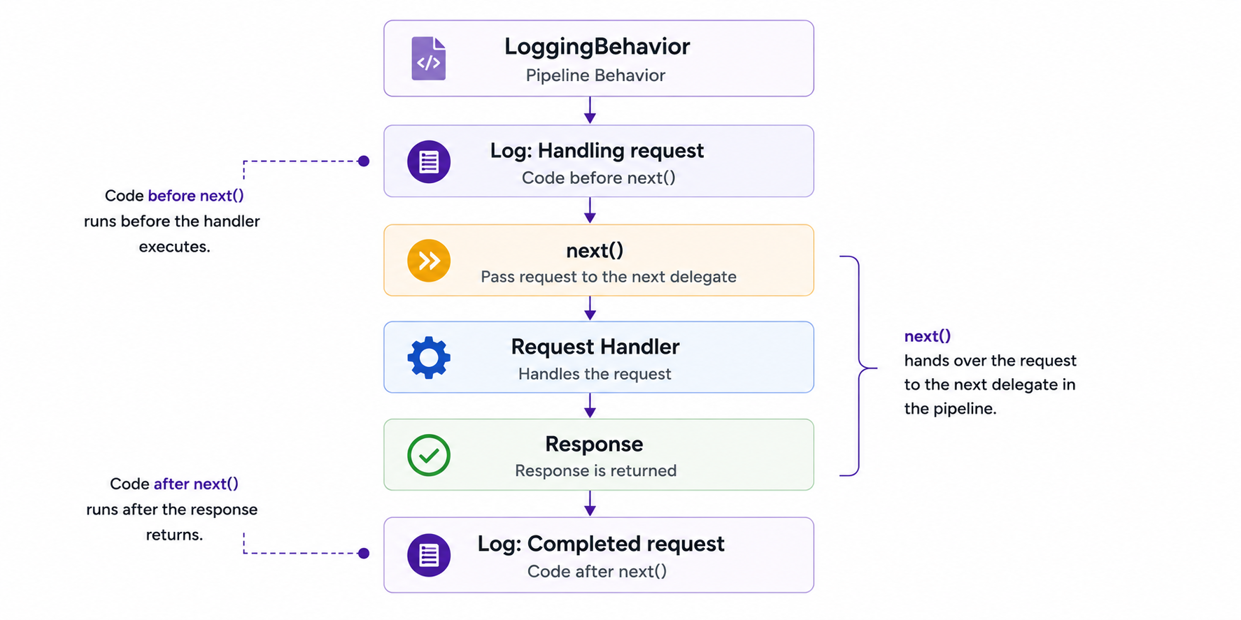
For example, when the controller sends a CreateProductCommand:
var result = await _mediator.Send(command);the logging behavior can produce messages similar to:
Handling request: CreateProductCommand
Completed request: CreateProductCommand
The controller and CreateProductCommandHandler don't need to contain any logging code. The behavior surrounds the handler execution and handles the logging independently.
The next step is to understand what IPipelineBehavior<TRequest, TResponse> actually represents and how each part of its Handle method fits into this flow.
Understanding IPipelineBehavior<TRequest, TResponse>
Now that we have seen LoggingBehavior, let's look at the interface it implements:
public class LoggingBehavior<TRequest, TResponse>
    : IPipelineBehavior<TRequest, TResponse>
    where TRequest : notnull
IPipelineBehavior<TRequest, TResponse> is the MediatR interface that allows a class to participate in the request pipeline. The two generic parameters represent the request being processed and the response that will eventually be returned by its handler.
TRequest is the type of request being sent through MediatR. For example, when we send a CreateProductCommand, TRequest represents CreateProductCommand. The same behavior can therefore work with CreateProductCommand, UpdateProductCommand, GetProductByIdQuery, or any other request handled by MediatR.
TResponse represents the response type associated with that request. If CreateProductCommand implements IRequest<int>, then TResponse will be int. This allows the behavior to work with different request and response types without creating a separate behavior for each one.
The interface requires us to implement the Handle method:
public async Task<TResponse> Handle(
    TRequest request,
    RequestHandlerDelegate<TResponse> next,
    CancellationToken cancellationToken)
request is the actual command or query - useful when the behavior needs to read its properties, such as logging specific field values or checking permissions.
next is the delegate that drives the pipeline forward. Call it and execution moves to the next stage; skip it and the pipeline stops here.
cancellationToken comes from the original Send() call. Pass it to any async work inside the behavior.
Finally, the Handle method returns TResponse, which is the same response produced by the handler. That's why our behavior stores the result of await next() and returns it:
var response = await next();

return response;
Once next() returns, execution is back inside the behavior with the response - that's what makes it possible to run logic on both sides of the handler.
Understanding next()
One thing worth calling out explicitly: if you don't call next(), the pipeline stops and the handler never runs. To see why, look at the Handle method again - await next() is the exact line where control leaves the behavior and the handler takes over:
public async Task<TResponse> Handle(
    TRequest request,
    RequestHandlerDelegate<TResponse> next,
    CancellationToken cancellationToken)
{
    _logger.LogInformation(
        "Handling request: {RequestName}",
        typeof(TRequest).Name);

    var response = await next();

    _logger.LogInformation(
        "Completed request: {RequestName}",
        typeof(TRequest).Name);

    return response;
}
What happens if we remove that call?
_logger.LogInformation("Handling request");

// next() is not called
The handler is never reached. Most behaviors will always call next(), but skipping it intentionally is useful in some cases - a validation behavior, for example, can return early without calling next() if the request fails validation.
When multiple behaviors are registered, each calls its own next(), handing off to the next behavior in the chain. The registration order in Program.cs controls the sequence.
Registering the Pipeline Behavior
Creating the LoggingBehavior class is not enough for MediatR to use it. We also need to register the behavior with the dependency injection container so MediatR knows that this behavior should be part of the request pipeline.
Open Program.cs and update the MediatR registration:
builder.Services.AddMediatR(config =>
{
    config.RegisterServicesFromAssembly(typeof(Program).Assembly);
    config.AddOpenBehavior(typeof(LoggingBehavior<,>));
});
The RegisterServicesFromAssembly call registers the MediatR handlers from the specified assembly, while AddOpenBehavior tells MediatR to include our Pipeline Behavior when processing requests.
Here, LoggingBehavior<,> is an open generic type. We don't register a separate behavior for every command or query. MediatR can create the appropriate closed generic version when a request is processed.
For example, when the application receives a CreateProductCommand, MediatR can use the behavior as:
LoggingBehavior<CreateProductCommand, int>If GetProductByIdQuery returns ProductResponse?, the same behavior can be used as:
LoggingBehavior<GetProductByIdQuery, ProductResponse?>A single LoggingBehavior<TRequest, TResponse> covers every request in the application.
The controller and handler don't need to be changed. The controller can continue sending the request through IMediator:
var result = await _mediator.Send(command);MediatR now knows that the request should pass through LoggingBehavior before reaching its corresponding handler.
Using Multiple Pipeline Behaviors
A MediatR request can pass through more than one Pipeline Behavior. Instead of having a single behavior around the handler, we can register multiple behaviors, with each one responsible for a different concern.
Each behavior can call next() to continue the request to the next stage. Once the next stage finishes, execution returns to the previous behavior.
The behaviors form a chain around the handler:
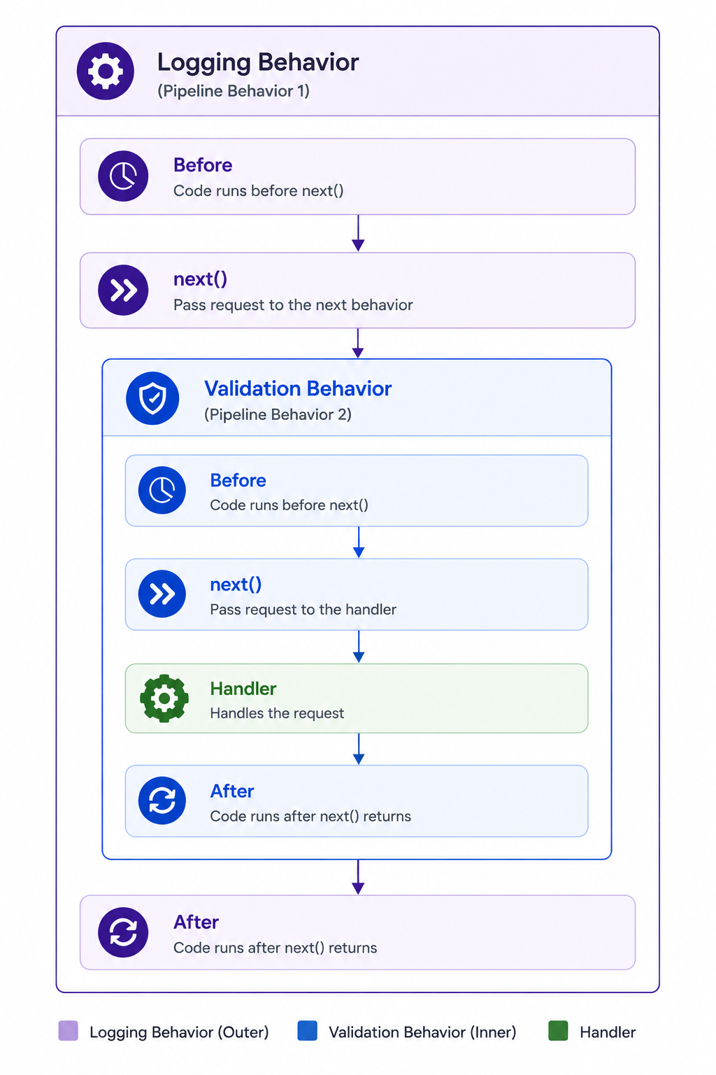
The order of these behaviors matters because each behavior wraps the ones that come after it. If the logging behavior is registered before the validation behavior, logging starts first and its code after next() runs only after the validation behavior and handler have completed.
Each behavior is independent - you can add, remove, or reorder them in Program.cs without touching the handlers.
Where Pipeline Behaviors Can Be Used
Pipeline Behaviors are useful whenever the same logic needs to be applied to multiple MediatR requests. Instead of adding that logic separately to every handler, we can place it in a behavior and let the request pass through it automatically.
Some common examples include:
- Logging - record which requests are being processed and when they complete.
- Request validation - validate commands or queries before allowing them to reach the handler.
- Performance monitoring - measure how long a request takes to complete.
- Authorization - check whether the current user has permission to execute a particular request.
- Transactions - wrap certain operations in a transaction when multiple database changes need to be treated as one operation.
- Exception handling - handle or log exceptions around request execution where this approach fits the application's requirements.
Keeping these concerns outside the handler means each handler stays focused on one thing - the actual operation it was written to perform.
Advantages and Tradeoffs
The main benefit is straightforward: you write shared logic once. If the same concern belongs in every handler - logging, validation, performance tracking - it belongs in a behavior instead. One class, registered once, applied to every request automatically. When that logic needs to change, there's one place to update.
The tradeoff is traceability. When something goes wrong, there are now extra layers between the controller and the handler. Two behaviors registered is manageable; six is a debugging problem waiting to happen.
The practical rule: if only one handler needs a piece of logic, keep it in the handler. The value of behaviors is specifically that the logic is genuinely shared across multiple requests. Using them to move single-use concerns out of a handler doesn't reduce complexity - it just relocates it.
Conclusion
Pipeline Behaviors are one of those MediatR features that feel like overkill the first time you see them and obvious the second. Once you've had to copy the same logging or validation logic into a dozen handlers, having a single class that handles it across every request makes a lot of sense.
The LoggingBehavior here is intentionally minimal - just logging the request name - but the same pattern scales to validation, performance monitoring, transactions, and more. The handler stays focused on its actual job; the behavior handles everything around it.
The complete source code is in the same repository from the previous article:
GitHub Repository: https://github.com/YogeshHadiya33/CQRSWithMediatRPipelineBehaviors